Responding to RFQs
A vendor on the Gearflow network gets a Request from a buyer. Sales Hub Pro lets them respond with a Quote in three ways: type it in, upload a quote PDF and let Gearflow extract it, or email a quote and let Gearflow do the rest.
#Why this exists
Vendors don't want to learn a new tool. Sales Hub Pro's response paths are designed around that: a vendor can keep working the way they've always worked — emailing PDFs — and the buyer still gets a structured Quote.
#The vendor's inbox
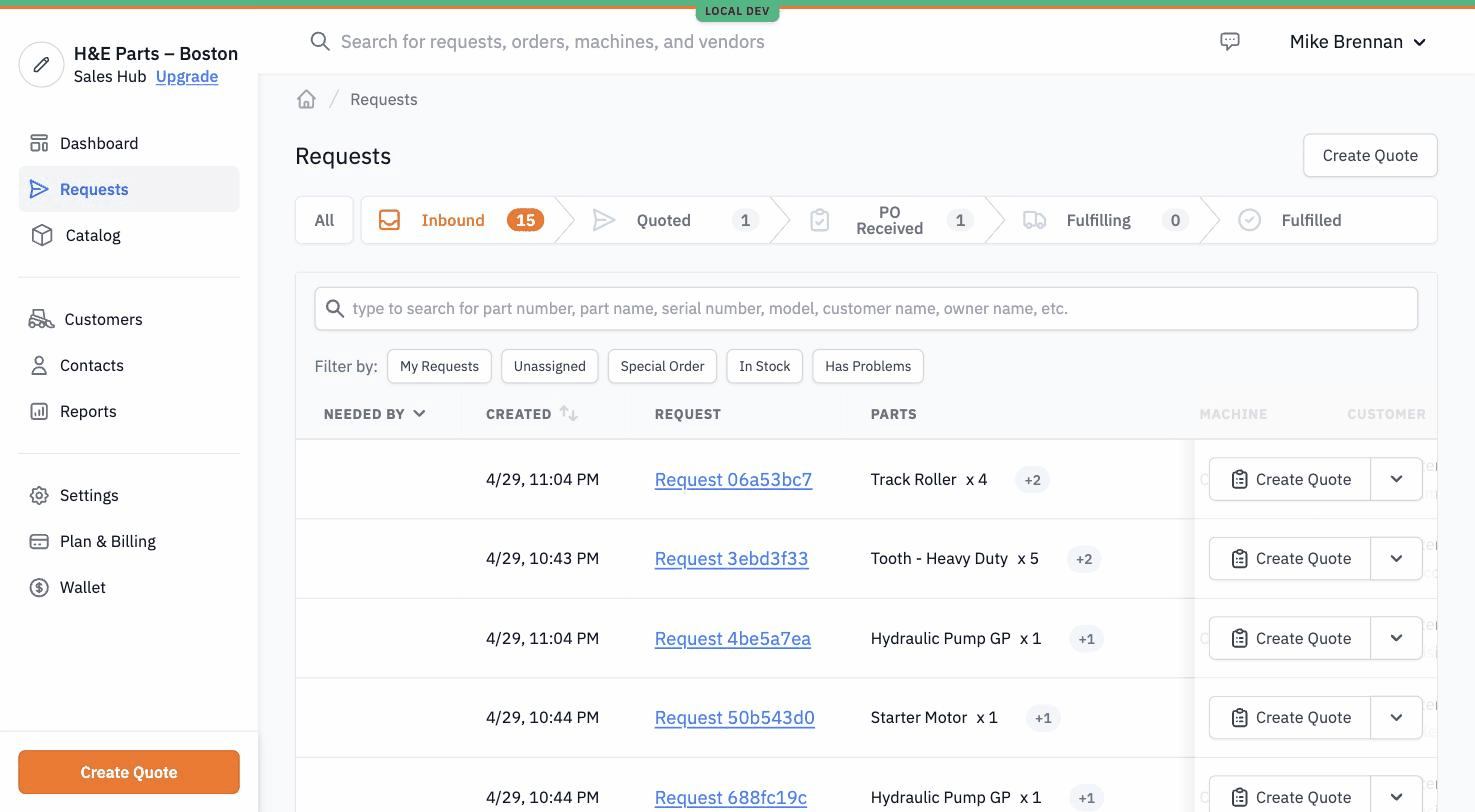
Each Request a vendor's been invited to lands in their Requests tab in Sales Hub Pro. The list mirrors the buyer's view but inverted: the vendor sees Requests they've received, with the same lifecycle states relabeled from the dealer's perspective.
#The three response paths
#1. Quote Builder (manual entry)
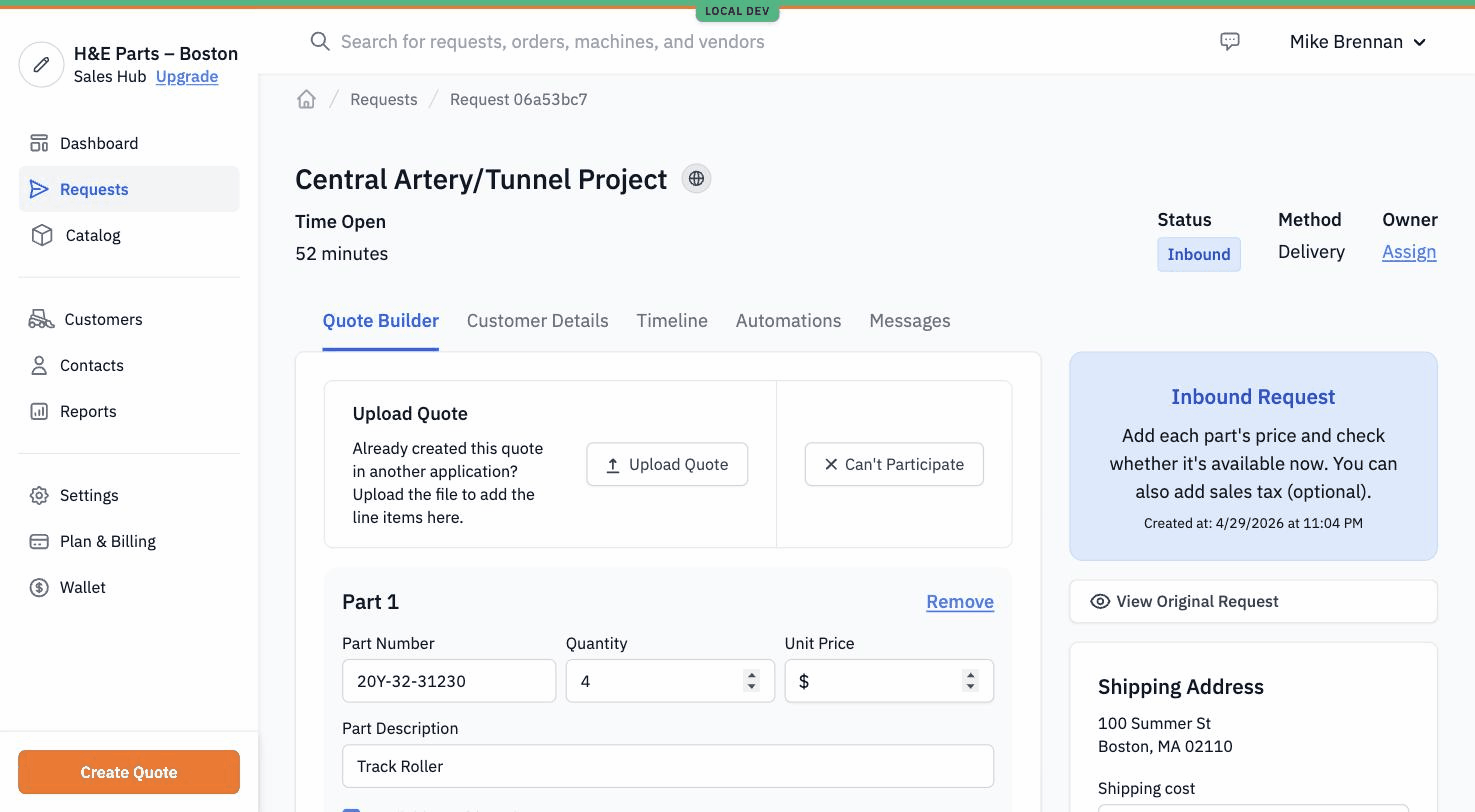
The default path. The vendor opens the Request, sees the parts the buyer asked for, and fills in price and availability for each. They can mark items in stock or out, add a delivery method, set tax and shipping, then submit.
For most vendors, this is the path they end up using day to day. It's faster than email for routine quoting because the parts are already on the screen.
#2. PDF upload (with extraction)
Some vendors generate quotes in their own ERP or accounting tool and don't want to retype anything in Sales Hub Pro. The Upload Quote button on the Quote Builder accepts a PDF; Gearflow runs its quote-extraction model over it, pulls out the line items, and prefills the Quote Builder with what it found. The vendor reviews and submits.
Extraction isn't perfect — line items can be missed or mismatched — so the vendor still gets a chance to correct anything before sending.
#3. Email-to-Quote
The path of least friction. A vendor's existing workflow is "email the customer a PDF quote." They keep doing that — they email the quote to a Gearflow address. Gearflow's mail processor picks it up, classifies the document as a quote, runs the extraction, and creates the Quote on the buyer's Request directly. The vendor never opens Sales Hub Pro for that quote.
The buyer sees a populated Quote in their Orders inbox without ever knowing the vendor wasn't using the app. The vendor never had to switch tools.
#What happens after the Quote
Once the vendor submits, the Quote appears on the buyer's Request as a row in their Orders list with status "Quoted." The buyer reviews, picks one, and hits accept. From the vendor's side, the Request moves from Inbound to PO Received; this is the "your customer chose you" moment.
From there the vendor's lifecycle is shipping (mark items shipped, attach tracking), then invoicing. That's a separate article.
#Tips
- "Can't Participate" is the polite-decline path. A vendor who can't fulfill a Request can mark it as such instead of leaving it in their inbox. The buyer sees the decline and adjusts.
- Quote PDFs come in lots of shapes. Extraction works well for clean, modern templates and degrades on faxed-and-scanned PDFs from older ERPs. It's great when it works, and the vendor still has the manual quote builder when it doesn't.
- Sales Hub Pro is its own product. A vendor who only uses Sales Hub Pro is on a different product than the buyer — pricing, account setup, and admin live separately from the buyer side.