Predicted Part Requests
Gearflow watches a buyer's order history and surfaces the parts that are about to come due — so reorders happen before someone has to remember.
#Why this exists
For a parts manager at a heavy-civil contractor, half the day is figuring out what to order next. Filters, hoses, hydraulic fluid, ground-engaging tools — the same parts cycle through the same machines on the same intervals, but nobody is tracking the cadence anywhere except in someone's head.
Once a buyer has been ordering through Gearflow for a while, the cadence is right there in their order history. Predicted Part Requests reads that history and tells the buyer: here are the parts due in the next few days, based on how often you've ordered them before. The buyer turns each one into an RFQ in a click, or dismisses it if they don't need it this cycle.
It's the lowest-effort way for an experienced Parts Hub Pro account to stay ahead of routine reorders, and it gets stronger the longer the account has been on the platform.
#What you're looking at
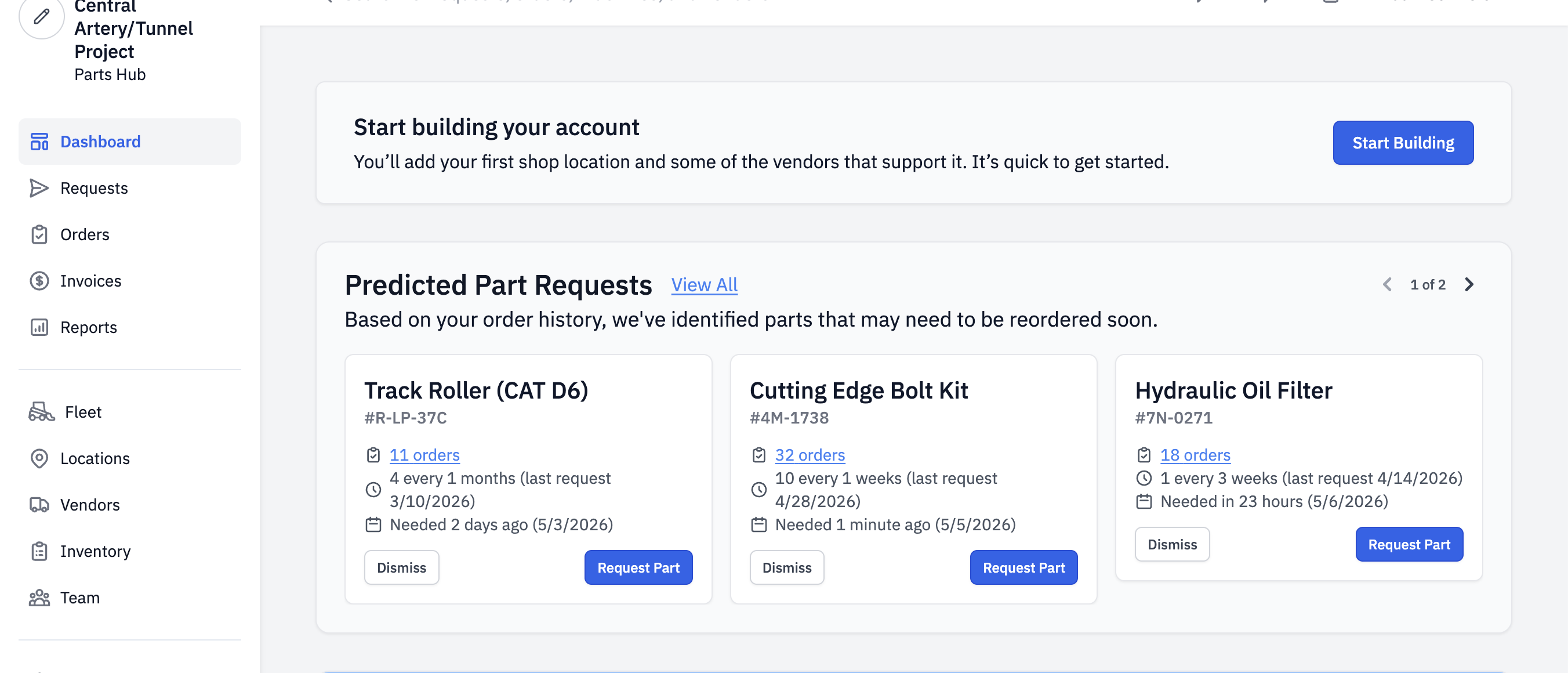
Each card shows:
- Part name and MPN. Pulled from the most-common product name and the manufacturer part number across past orders.
- The machine it's been ordered for. If the part has been bought for one machine, the card names it; if it's been bought for several, it shows "for multiple machines" with a tooltip.
- Order count. The number of past orders ("11 orders," "32 orders") links into the Parts Consumption report filtered to that part's history.
- Cadence. A plain-English read of how often the part is reordered ("4 every 1 months," "10 every 1 weeks") plus the date of the most recent request.
- Needed-by date. The predicted date this part is due again, computed from the average interval between past orders.
#Lifecycle of a single prediction
A prediction starts Suggested: it shows up in the carousel and in the View All list. The buyer either turns it into an RFQ (the prediction goes away because the part has just been ordered) or hits Dismiss.
Dismissing isn't permanent. It snoozes the suggestion for one full cadence — if the buyer has historically ordered this part every six weeks, a dismissal hides it for six weeks. After that, the suggestion comes back. So "Dismiss" is closer to "not this cycle" than "ignore forever."
#How predictions are made
Plain English: Gearflow looks at every past order for a given part and a given organization, computes the average gap between those orders, and projects forward from the most recent order.
The part needs at least three prior orders in the buyer's organization before Gearflow will predict a needed-by date. With fewer than three, there isn't enough history to estimate cadence — the part still shows up in the Parts Consumption report (the View All view), but without a predicted date and without a card on the dashboard.
The dashboard carousel is intentionally narrow: it shows parts coming due in the next three days, plus high-cadence established parts (more than ten orders, ordered weekly or faster). Everything else lives in the View All list.
This is statistical cadence detection, not a model — no ML, no LLM, no opaque black box: Gearflow tracks your order history and does the math you'd do in your head if you had time.
#Walkthrough
#Step 1: A buyer lands on the dashboard
The carousel sits near the top of the buyer's home page, above their reports and metrics, so it's the first thing they see when they log in. If there are no qualifying suggestions, the carousel doesn't render at all — buyers without enough order history just don't see this section.
#Step 2: Skim the cards
Each card carries enough on it to decide without clicking through: what part, for what machine, how often, when. The carousel shows three cards on desktop; the arrows in the top right page through the rest.
#Step 3: Convert to an RFQ — or dismiss
Request Part drops the buyer into the standard Order Parts wizard with the part name, MPN, and quantity already filled in. From there it's the regular Standard RFQ flow: pick the location, pick vendors, submit. Once the order goes out, the underlying suggestion clears (the cadence math sees the new order and the next prediction shifts forward).
Dismiss hides the suggestion until one full cadence has passed. No confirmation dialog — it's a one-click action.
#Step 4: View all
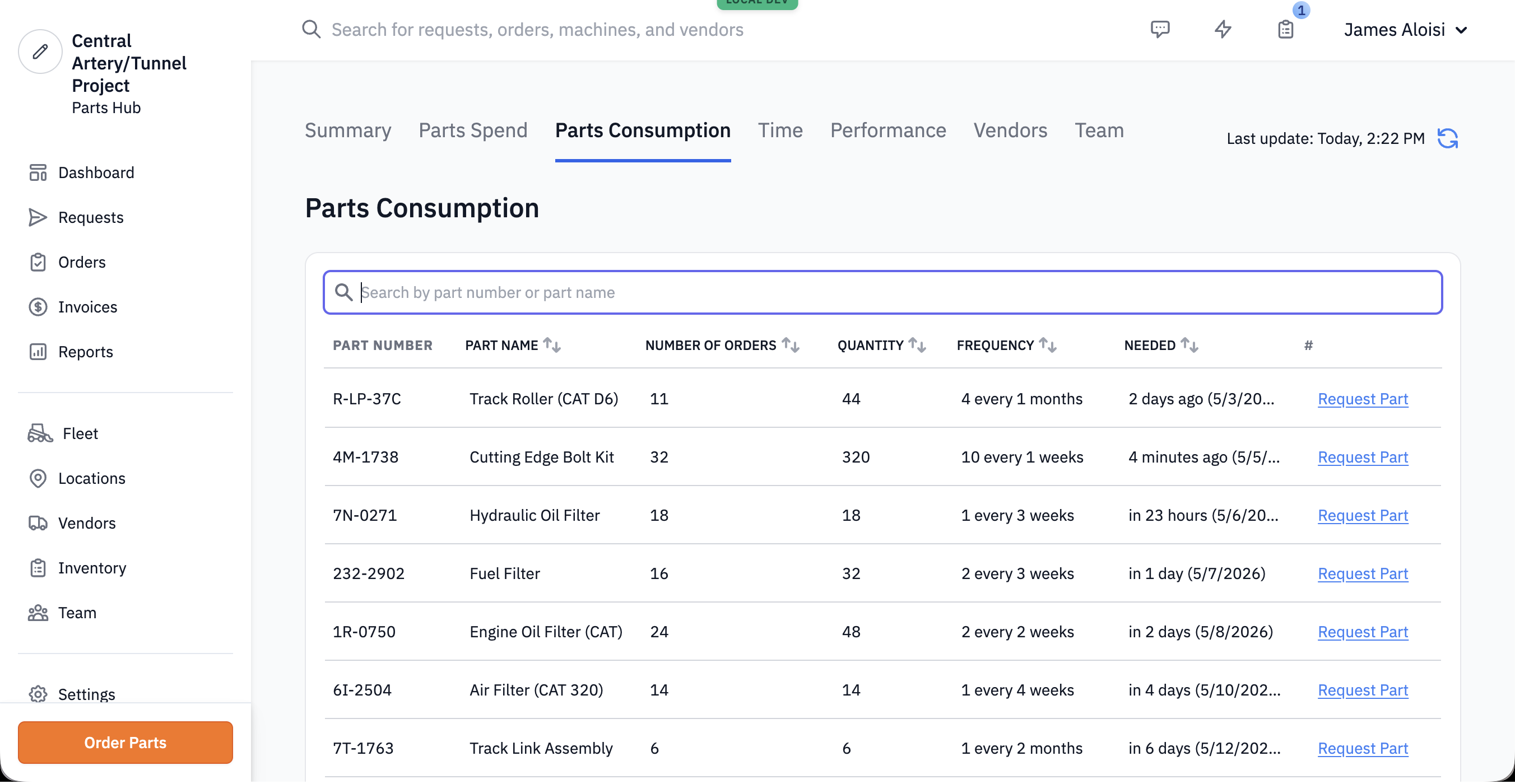
Clicking View All on the panel opens the Parts Consumption report — a table of every part the buyer has historical orders for, predicted or not, sortable and searchable.
#Tips
- Predictions need order history. They only work once a buyer has at least three orders for a part in Gearflow. New accounts won't see anything here for weeks; long-tenured accounts with months of order history get the full payoff.
- The dashboard panel is narrow on purpose. It only shows parts due in the next three days plus high-cadence regulars — not the buyer's whole consumption catalog. It isn't a global parts-tracking dashboard; that's the View All / Parts Consumption page.
- "Request Part" goes through the standard wizard. Once the buyer commits, it's the same Standard RFQ flow as if they'd started from scratch — same vendor selection, same location step, same review. The prediction just saves the typing.
- Pair this with the Parts Consumption report. The report is also the right surface when you want to see what your spend on a part looks like over time — the same prediction record links to its own historical orders.
- Don't conflate this with a reorder point or min/max system. Gearflow doesn't track inventory levels — it tracks order cadence. A buyer who keeps their own stock and only orders to refill bins will get less out of this than one whose orders track real consumption.