Dealer team SOPs · 3 of 8
Customer approval by text or email
A customer approves your quote in one of three ways: a reply to the text, a reply to the email, or the approval link. Each one lands on the request and moves it to PO received. Check each reply that Gearflow did not record.
Who: the owner of the request. When: each time a customer answers a quote.
#How a customer approves
| The customer… | What happens |
|---|---|
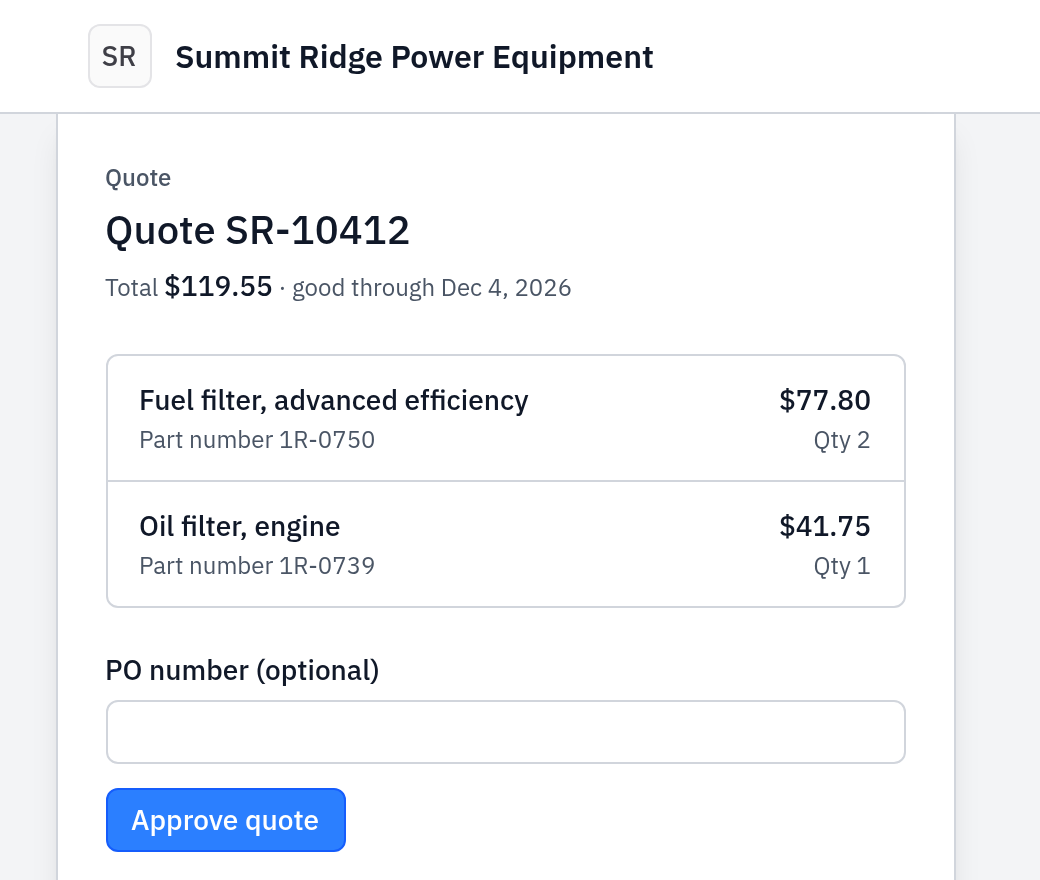
| Opens the link "Approve the quote and add your PO number here", enters a PO number and clicks Approve quote | The approval and the PO number are recorded. The customer sees "The dealer has your approval." |
| Replies to the email with a yes, for example "Approved" | The approval is recorded. |
| Replies to the text with a yes, for example "Approved, PO 4512" | The approval and the PO number are recorded. |
| Replies with a no, for example "No thanks" | The decline is recorded. The request goes back to Inbound. |
The approval page has no decline button. A customer who does not want the quote replies to the message.
#Replies that Gearflow records
Gearflow reads only the first line of the customer's reply.
- A yes: approve, approved, accept, accepted, go ahead, proceed, please proceed, looks good, sounds good, yes please, let's do it, we'll take it.
- A no: no thanks, no thank you, decline, declined, we'll pass, pass on it, not interested, reject, rejected, don't need it, don't want it.
Gearflow does not record an answer from these replies. The message still lands on the request, and you must read it:
- "Yes", "OK" or "No" alone.
- A first line longer than 120 characters.
- A question, for example "Can you do it for less?"
- A line with a yes and a no, or a yes with "not" or "can't" ("not approved yet").
#Steps
- Open Messages → Mentions. A customer's reply on a request you own shows there (see Messages).
- Open the reply. It opens the request's customer thread.
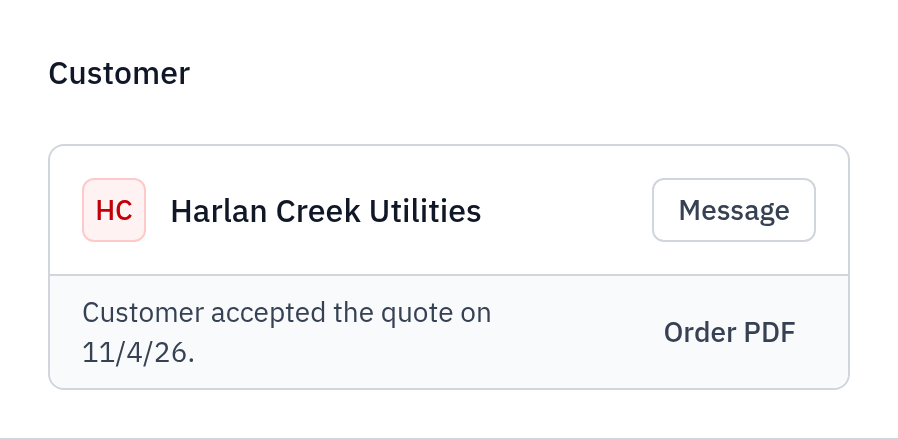
- Read the Customer card on the request:
- "Customer accepted the quote on date." The approval is recorded. The PO number follows it if the customer sent one. Go to step 5.
- "Customer declined the quote…" or "Customer asked for a revision of the quote…": change the quote with Update quote, or click Mark lost.
- Still "Quote sent": Gearflow did not record an answer. Go to step 4.
- If the customer clearly said yes but Gearflow did not record it, reply in the thread and ask them to answer "Approved" or to use the approval link. Do not assume an approval that is not recorded.
- When the approval is recorded, the request moves to the PO received lane. Ship or stage the order: see Ship or stage an order.
#What you see after
- The request is in the PO received lane, and its badge reads PO received.
- The Customer card reads "Customer accepted the quote on date.", and Order PDF gives you the order confirmation.
- A link approval adds the line "Customer approved quote number with PO number." to the thread.
#Common mistakes
- Waiting for a notice after a link approval. An approval by the link sends you no email or text. Check the PO received lane each day.
- Expecting "yes" to count. A bare "yes" or "ok" records nothing. Ask customers to reply "Approved", or "Approved, PO number".
- Approving an old version. After you click Update quote, an approval of the old version no longer counts. The approval page tells the customer: "The dealer updated this quote. Review it and approve again."
- The link stopped working. The approval link works for 30 days, and it stops if the rep who sent the quote leaves your account. Send the quote again with Update quote.
- A valid-until date does not stop an approval. A customer can approve a quote after its Valid until date. If your prices changed, send an updated quote.