Messages: Mentions and Subscribed
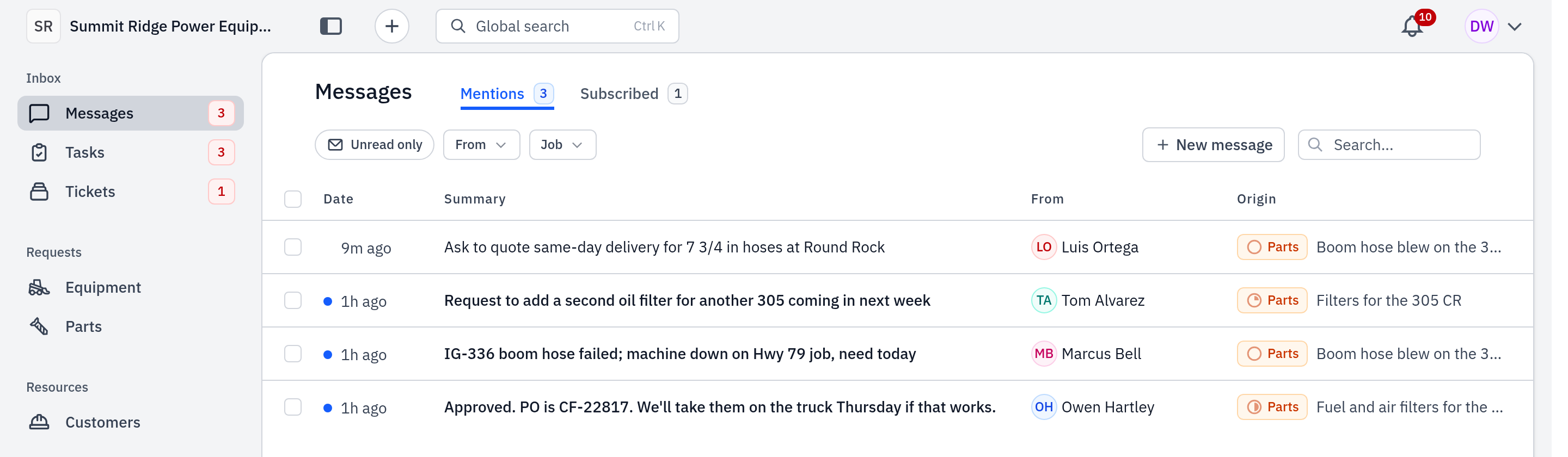
Messages has two tabs. Mentions holds what needs you: a customer's reply on a request you own, an @mention, a direct message. Subscribed holds the rest of the talk on the tickets and requests you follow. Work Mentions to zero each day.
Who: every rep. When: at the start of the day, and each time the Messages count in the sidebar goes up.
Video: Message the customer (1:17) shows how to answer a customer on a request.
#What goes where
| Tab | What lands there |
|---|---|
| Mentions | A customer's message on a request or ticket you own. A message that @mentions you. Each direct message. A vendor's reply to an RFQ you sent. |
| Subscribed | Messages on tickets you follow (from the time you started to follow them). Messages on parts requests you own or asked for, or that came from a ticket you follow. |
A customer's reply goes to the owner's Mentions. That is why each request needs an owner: see Work the requests inbox.
The number on Messages in the sidebar counts unread Mentions only.
#Steps
- In the sidebar, click Messages. It opens on Mentions.
- Click Unread only to see only new messages. A blue dot marks each unread row.
- Click a row. The thread opens, and the row is marked read.
- Answer the customer in the thread, or act on the request (see Customer approval).
- To mark many rows at once, select them, then click Mark read or Mark unread.
- Click Subscribed to read the rest of the talk on the work you follow.
- Use From, Job and the search box to find one message.
#Follow a ticket
- On the ticket's discussion, click Subscribe. Click Unsubscribe to stop.
- To add a teammate, use Subscribers and search for their name.
- You follow a ticket on your own when you create it, when you become its owner, or when someone @mentions you as the ticket is created.
#Email and text notices
Go to Settings → Your notifications to choose Email, Text and App for each kind of notice. Texts stay off until you click Add & verify phone and verify your phone. The settings apply to this account only.
#Common mistakes
- A request with no owner. The customer's reply goes to nobody's Mentions. Assign an owner on each request.
- A reply does not make you follow. When you send a message on a ticket, or a teammate @mentions you later, you do not follow the ticket. Click Subscribe if you want its messages.
- Expecting old messages in Subscribed. You see only the messages written after you started to follow a ticket.
- Expecting equipment, maintenance or mobilization messages in Subscribed. Subscribed holds tickets and parts requests only.
- Mark unread on a thread. It also marks the later messages in that thread unread.
- The bell is not Messages. The bell at the top holds notices (Inbox and History). Customer talk is in Messages.