Order timeline
Every quote and order in Gearflow records a timeline of itself: who created it, every edit, the moment it was approved, when it shipped, when an invoice arrived. Buyers and dealers see the same trail from their respective sides.
#Why this exists
The procurement conversation between a buyer and a vendor is rarely clean. A vendor sends a Quote, the buyer asks for a different quantity, the shipping cost gets revised, an item gets added or dropped — and somewhere in there both sides agree on a number. Days later, when an invoice doesn't match the original Quote, the question "what changed?" needs to be answerable in seconds, not by hunting through email.
The timeline solves this. Every event that touches the Quote or Order is recorded with a snapshot of what the order looked like at that moment, and "Order edited" events spell out what changed compared to the previous state. It is the audit trail that makes a multi-step negotiation legible after the fact.
#What you're looking at
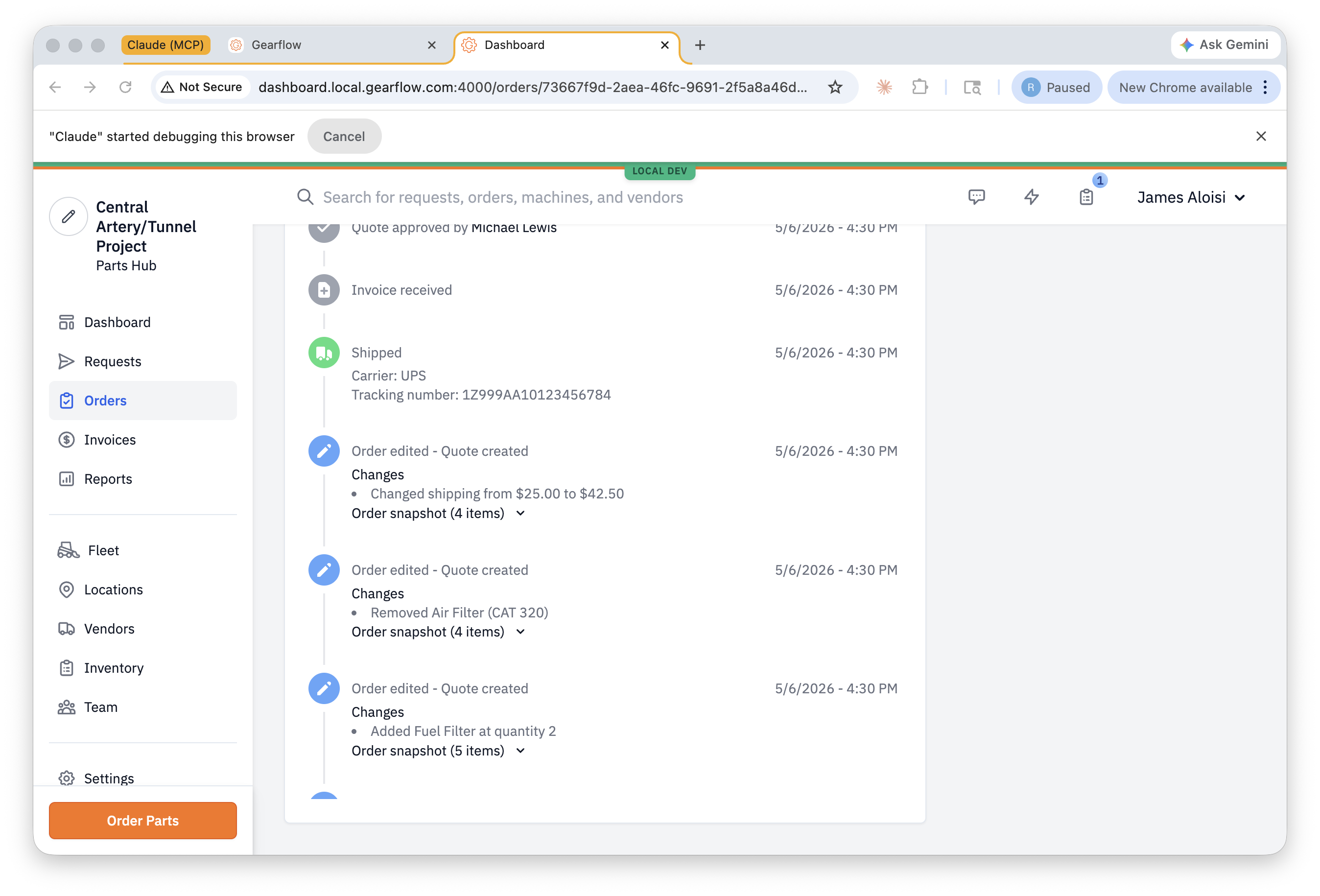
Each entry contains:
- An icon tying it to the event type and a one-line description ("Quote approved by …", "Order edited — Quote created", "Shipped", etc.)
- The timestamp.
- For lifecycle markers, any structured detail tied to that event: carrier and tracking number on Shipped, the buyer's name on Shipment received, etc.
- For "Order edited" events, a Changes bulleted list of what shifted versus the previous snapshot.
- An Order snapshot disclosure that, expanded, shows the full set of line items, shipping, and tax at that point in time.
#What the change diff covers
The "Changes" bullets describe the delta between consecutive snapshots. The diff covers:
- Line additions and removals — "Added Fuel Filter at quantity 2," "Removed Air Filter (CAT 320)."
- Quantity changes on existing lines — "Changed quantity of Engine Oil Filter (CAT) from 1 to 5."
- Shipping cost — "Changed shipping from $25.00 to $42.50."
- Tax cost, delivery method (Ship vs Pickup), and shipping/lead time when those change.
It does not surface unit-price changes on existing lines. If a vendor revises only a unit price (and quantity stays the same), the "Changes" header still appears but the bullet list comes up empty. The price difference is still visible inside the snapshot disclosure for both events; it just isn't called out at the top level.
#The snapshot disclosure
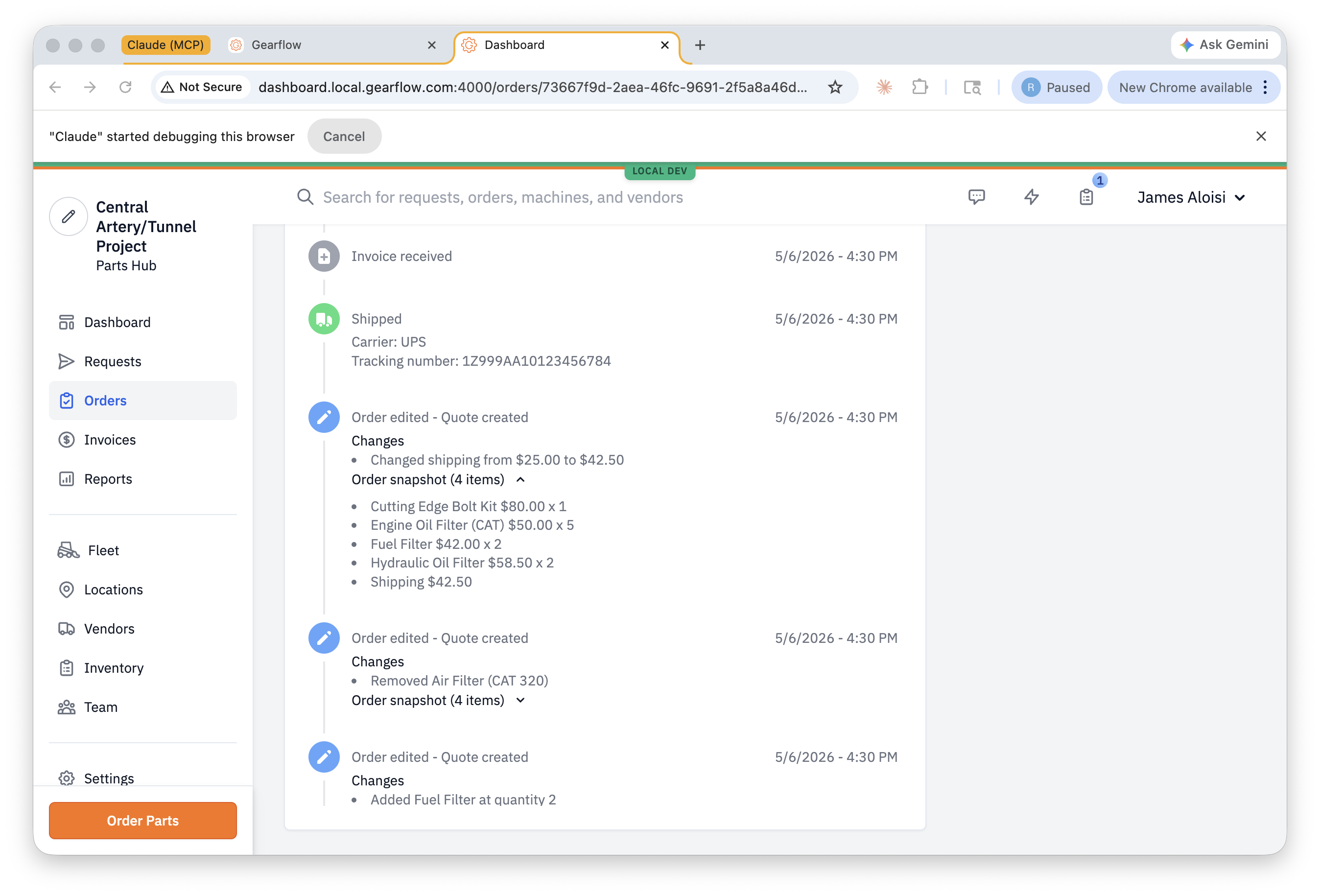
The snapshot is the canonical "what did the order look like right then" record. It's available on the initial Quote-created event, on every "Order edited" event, and on a few other event types that change the order's shape.
#Where it surfaces
The same timeline data renders on both sides of Gearflow:
- Parts Hub Pro — the buyer's Order detail page has a Timeline tab. Buyers can also leave their own timeline notes (visible only to their team) from the comment box at the top of the panel.
- Sales Hub Pro — the dealer's request detail has the equivalent panel, with the same events from the dealer's vantage point.
Both sides see the same lifecycle of the Quote-then-Order, but each side's version filters out events that don't belong to it (e.g., a buyer's private timeline note doesn't show up on the dealer side).
#Tips
- This answers "where did the price come from?" When an invoice doesn't match the original quote — or a quote total moved between two emails — the timeline is the receipt. Open the order, click Timeline, and scroll to the date in question.
- Use the snapshot disclosure to resolve disputes. Buyers sometimes claim "I agreed to X but you billed me Y." The snapshot at the moment they hit Approve is the canonical state — it's right there in the timeline.
- Buyer notes are private. The comment box on the buyer's Timeline panel is for the buyer's team only; dealers and Gearflow don't see it. Useful as a place to record a phone-call summary or an internal approval, without leaking it across the relationship.
- Lifecycle markers are silent — they don't show diffs. Quote approved, Shipped, Invoice received — these mark a state transition but don't carry a "Changes" list. The real diff content is on "Order edited" events.