Roles and permissions
Four roles map cleanly to real jobs — admin, dispatcher, requester, ticket creator — so adding a teammate is a one-pick decision, not a permissions matrix.
#Why four roles, not a matrix
The instinct with permissions software is to expose every action as a checkbox and let admins build their own role. Gearflow takes the opposite bet: most heavy-civil contractors have the same shape of office and field, so four named roles cover almost every real-world setup. An admin picks the role that matches the job; the permissions follow.
The role also drives pricing. Three of the four roles are paid seats — the people running procurement. The fourth, Ticket Creator, is unlimited and free, designed for everyone in the field who only ever files requests.
#The four roles
| Role | Seat | What they can do |
|---|---|---|
| Account Admin | Paid | Everything the platform offers. Manages users, business units, jobs, vendors, asset categories. Approves quotes, sends POs, configures integrations. |
| Dispatcher | Paid | The procurement workhorse. Takes a request from intake through quote, PO, fulfillment, and call-off. Can do everything procurement-related an admin can, but can't change account-level settings or add/remove users. |
| Requester | Paid | Files requests against the business units they're assigned to and watches them progress. Can't approve quotes or send POs. The role for foremen, project engineers, or anyone in the field who needs more than just a ticket form. |
| Ticket Creator | Free | One permission: file Tickets. Can't create equipment requests, mobilizations, maintenance work, or parts requests directly. Designed for unlimited field-side users — superintendents, foremen, mechanics — who only ever need to flag a problem. |
#What you're looking at
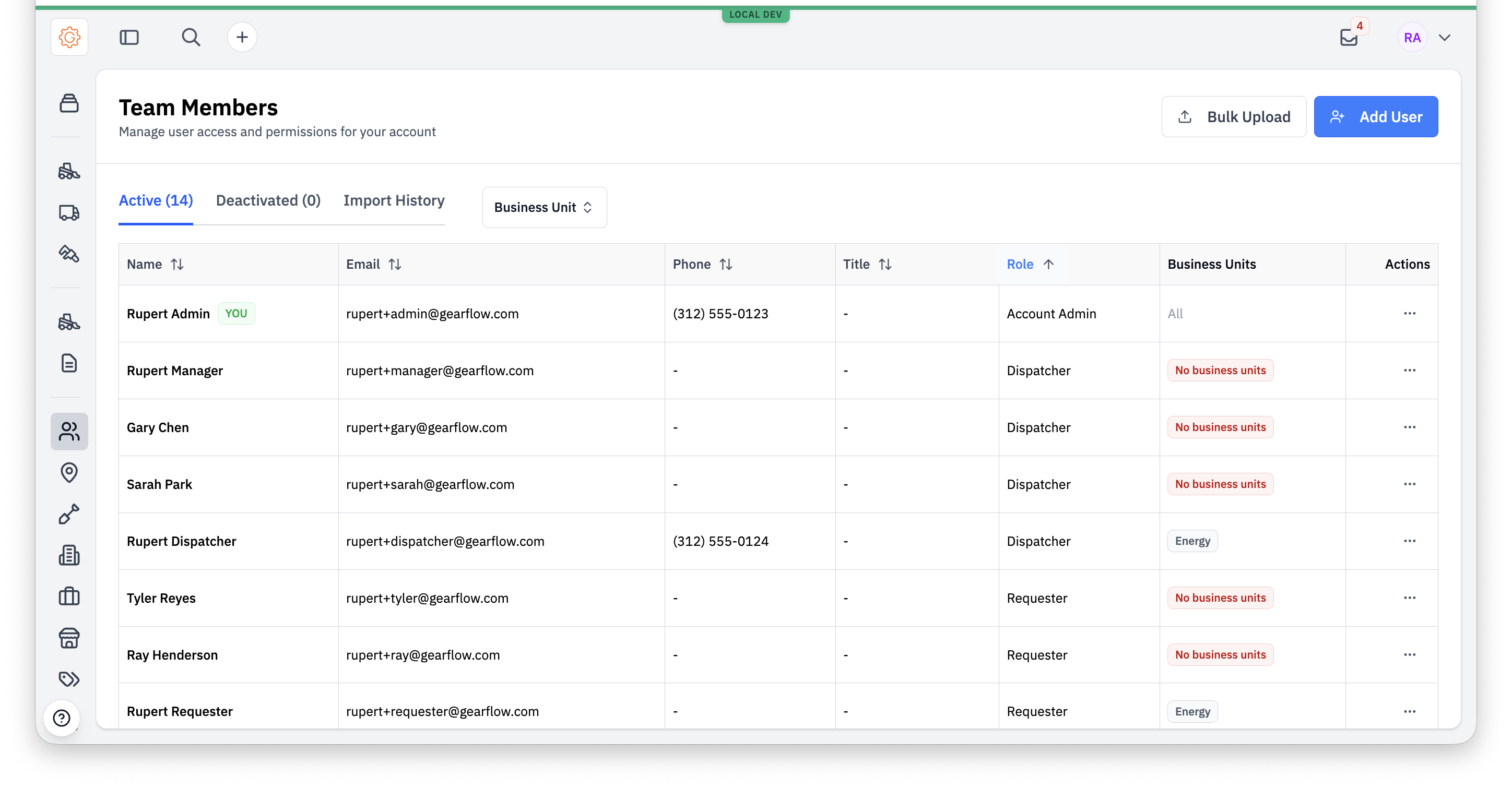
Roles are managed under Settings → Team Members. Each row shows a user, their role, and which business units they're scoped to. An admin can add, edit, or deactivate users from here.
#Adding a user
The Add User dialog asks for name, email or phone, role, and (for non-admin roles) business units. The role dropdown lists all four options.
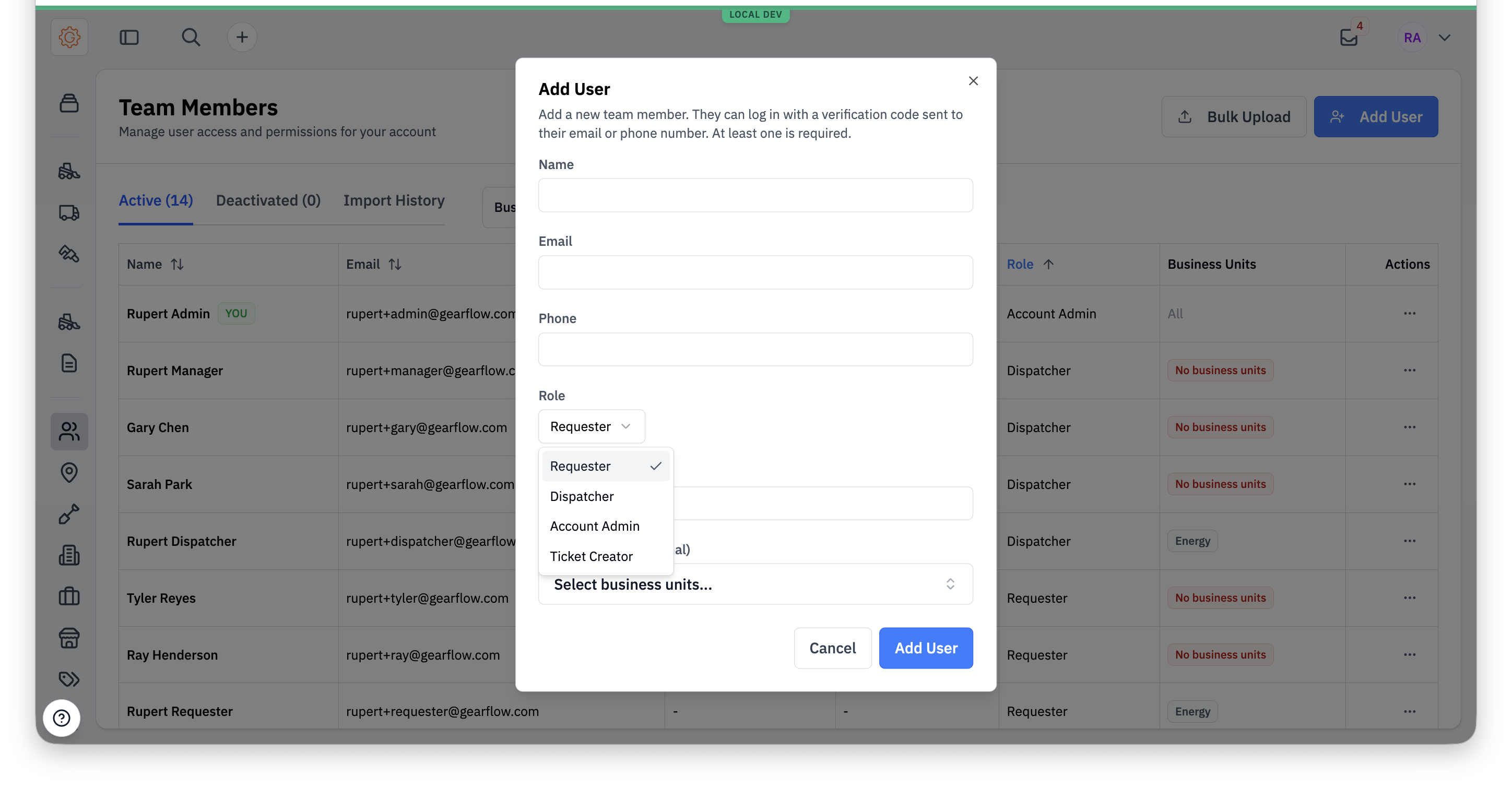
One small but meaningful exception: any authenticated user can invite a Ticket Creator, not just admins. A dispatcher can pull a foreman in directly without escalating. Invitations go out by email or SMS as a magic link — no password to set up.
#Business unit scoping
Larger contractors run multiple business units — a heavy-civil division, a paving division, a yard operations group — and don't want a requester at one to see the other's equipment requests. Roles other than Account Admin can be scoped to a subset of business units.
- Account Admin — always sees everything across the account.
- Dispatcher, Requester, Ticket Creator — see only the business units they're assigned to on Team Members. Requests they create get filed against those business units; lists they view are filtered to those business units.
A user can be assigned to multiple business units; the union of their assignments defines what they see.
#What each role can't do
The negative space matters as much as the positive. Quick reference:
- Dispatchers can't add or remove users, change account-level settings, or modify integrations. Everything procurement-related is open.
- Requesters can't approve quotes, send POs, log vendors, or modify vendor lists. They file requests and watch them progress.
- Ticket Creators can't create equipment requests, mobilizations, maintenance work, or parts requests directly. The Tickets pipeline can spawn those requests on their behalf, with a dispatcher reviewing — but the Ticket Creator themself never sees a Create Request button.
#How this maps to other surfaces
The full platform's roles are the primary identity for a Gearflow user. Some features bridge into Parts Hub Pro — the new parts intake at + → Create parts request is the most prominent — and a single person can have an account on both products. In that case, the user's role in each product gates what they can do in that product. The roles aren't currently kept in lockstep, so a Dispatcher in the full platform might be a Requester in Parts Hub Pro, or vice versa.
For features that cross between products, the rule of thumb: their full-platform role decides whether they can use the feature at all, and their Parts Hub Pro role determines what they can do once they're in.
#Tips
- Ticket Creator is the field-onboarding flow. Combined with the per-user phone number and the Save-to-Contacts button, it's the lightest possible bring-a-user-into-Gearflow flow — magic link by SMS, no password, no app to install.